
Have you ever noticed that sometimes you ask a question on Google and you're given the answer right in the search results, without clicking a link? Those are known as featured snippets: selected search results shown in a box at the top of Google's organic results. (These days you'll also see AI Overviews at the very top of many results; more on how those fit in below.) In this article, I'm going to break down my best tips and practices for winning and keeping featured snippets.
Before I teach you how to win featured snippets, let's look at the types Google typically shows. Knowing which kind of snippet appears for a search lets you optimize your content for that specific format.
Featured snippets aren't quite the same as an answer box. Answer boxes try to answer a question directly without linking out for more information, while a featured snippet gives you a link to the source. There are several types of featured snippets: paragraph, list, table, and video, but I'm going to focus on the three most common.
3 Most Common Types of Featured Snippets
- Paragraph snippet: The most common form (roughly half of all snippets) is a paragraph. Format the relevant content in a block of about 40 to 60 words so Google can easily lift it into a featured snippet.
- According to Moz, some common trigger words in these queries are: does, cost, different, much, what, can, average, and many more.
- See the example search result for 'how did apple get started':
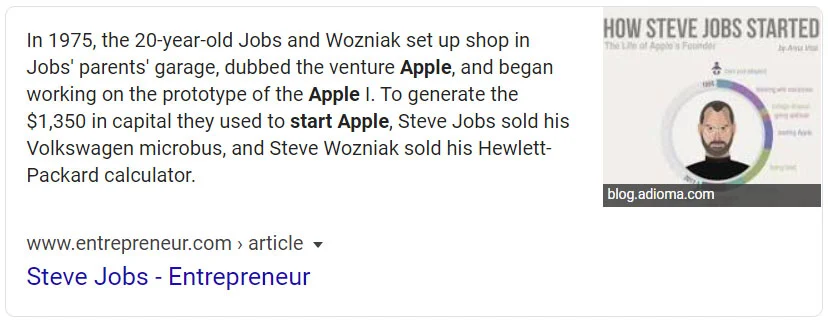
- Notice that Google highlights the keywords from your query within the block of text. So if you wanted to win this one, you'd make sure to use 'Apple' a couple of times, 'start' at least once, and of course mention Steve Jobs.
- List snippet: The second most common form (around a third of snippets) is a list. List snippets often pull from H2 and H3 subheadings used for each step or item. I've found that using H2 or H3 tags for the list items, with the detail in a paragraph beneath each, is the most reliable way to win list-style snippets.
- Trigger words that tend to surface list snippets include: best, improve, types, ways, recipe, and many more.
- See the example search result for 'how to start an online business':
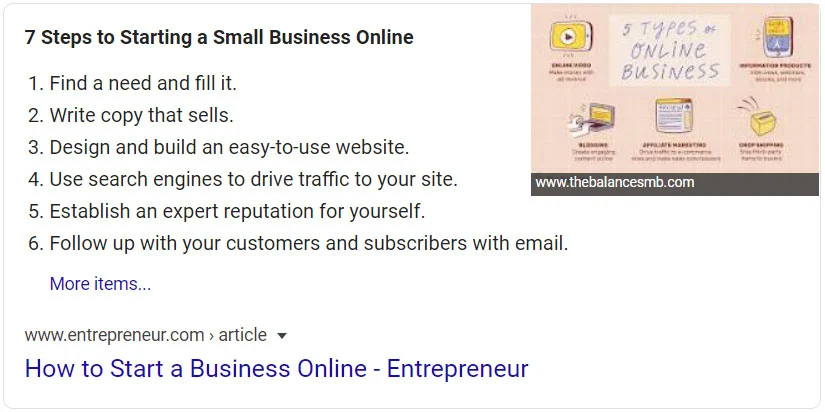
- The result has a title with almost all of the keywords from the search, 'start an online business.' Inspect the page's HTML and you'll find those items are H3 tags. Google draws importance from those subheadings.
So consider structuring lists with H2 or H3 tags for each item rather than relying only on plain ordered or unordered HTML lists. I've found it leads to more success winning list snippets.
- Table snippet: A smaller share of snippets (under 10%) appear as tables. These are fairly self-explanatory: your content needs to be in an actual HTML table. Include your keywords in the table headers, then add your data.
- Trigger words include: rates, fixed, salary, sizes, prices, highest, and many more.
- See the example search result for 'what is today's mortgage rate':
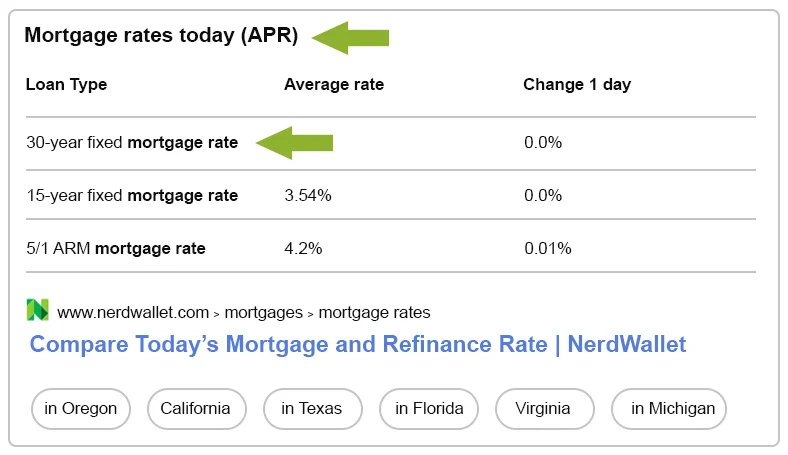
- There's a title above the table with the keywords 'mortgage rates today,' followed by clear table headers, the types of loans, and the rates.
(These proportions shift over time, but paragraph snippets remain the most common, followed by lists, then tables.) Now that you understand the three main styles, you can figure out how to win them for your ranking keywords.
Below are my four steps to win featured snippets. Everyone has their own variations, but these are the methods I consistently follow, with a track record to back them up.
4 Easy Steps to Win Featured Snippets
- Find the keywords you already rank for on page 1 of Google.
- Use your keyword tool of choice. I usually use Ahrefs or Moz. For these examples, I'll use Ahrefs.
- In Ahrefs, open your organic keywords and set the position filter from 1 to 10, so you only see keywords on page 1. You'll also see which featured snippets you may already be winning.
- Start with your most popular pages and your long-tail keywords. If a page already gets decent traffic, you can usually win its snippet faster, as long as you provide the best answer.
- The best answer includes the keywords from the search term you're targeting. As noted above, Google highlights the keywords it's looking for, so use them naturally in your answer and make that answer as accurate and complete as possible.
- Bonus: you can also start in Google Analytics 4 (GA4) with your most popular blog post or page, drop the URL into Ahrefs' Site Explorer, and filter organic keywords from positions 1 to 10. Work down the list, searching each keyword in Google to see if there's a featured snippet. If there is, optimize your content to win it; if not, move on and come back later.
- Know the searcher's intent.
- Search your target keywords in Google. Confirm there's a featured snippet, then analyze the top 10 results. What kind of pages are they, informational articles, product pages, something else? Knowing the intent tells you what kind of content to create.
- Look at the organic results alongside the paid ones. Analyzing the whole results page helps you understand what the user actually wants.
- Match that intent. If the top 10 are articles, write an article; if they're product pages, target the keyword with a product page. Give searchers the format they're looking for.
- In short: understand the search intent before you optimize your content.
- Check which type of featured snippet is being displayed.
- Make your content match the snippet format. If the snippet is a list, your content needs a list. If it doesn't have one, create a list from the relevant content.
- Paragraph snippets are the most common. They're blocks of about 40 to 60 words, and the best way to win one is to state the question in a heading (H2 or H3) and answer it immediately afterward.
- For paragraph snippets, it also helps to restate the question in your answer. For example: "How long did Steve Jobs work at Apple?" → "Steve Jobs worked at Apple for…"
- Google looks for the query's keywords within your answer, so use them as naturally and completely as you can.
- As with intent, know which snippet type Google shows for your target keyword before you optimize.
- Review your article.
- Check that you're using subheadings well. Are you asking questions in your subheadings? Use H2 or H3 tags for the questions and keywords you want to win snippets for.
- After each subheading question, are you answering it within 40 to 60 words, using the question's keywords, in a format that matches the snippet style?
- Aim to provide a better answer than the current snippet holder. Review who's winning it now and how they've structured their answer, then do it better.
- Structured data (schema markup) can also help search engines understand your content, but one important update: Google retired FAQ rich results (along with HowTo rich results), so FAQ schema no longer earns that expandable Q&A box in search the way it once did. Keeping valid schema doesn't hurt, and AI systems may still read it, but don't rely on FAQ markup for click-through. Focus your structured data on the types that still generate rich results, like Product, Review, Recipe, or Event where they fit your content, and give search engines as much accurate detail as possible.
Featured Snippets and AI Overviews
Since this article first published, the top of Google's results has changed. Google now shows AI Overviews, AI-generated answers that grew out of its Search Generative Experience (SGE), on a large share of searches. An AI Overview usually sits above everything else, including the featured snippet, pulling information from several sources into one answer with links to dig deeper. In effect, it's become the new "position zero."
The good news: you don't need a separate playbook. The same things that win featured snippets are cited in AI Overviews: clear question-based headings, direct and concise answers, well-structured lists and tables, and concrete facts. Pages that earn featured snippets are often the very ones AI Overviews cite.
A few tips that help with both:
- Answer first. Put a direct, two-to-three-sentence answer to the question right up top, before you expand into detail. This "answer-first" structure is one of the most effective things you can do to get cited.
- Be specific. AI Overviews tend to pull in concrete facts, statistics, and named examples rather than vague claims, so include them.
- Earn rankings first. AI Overviews draw from pages that already rank well, so the SEO fundamentals throughout this article are still what get you in the door.
Featured snippets still appear on plenty of searches, so they're well worth winning. Just think of them now as one part of a bigger goal: being the source Google trusts enough to feature, quote, and cite, whether that's in a snippet or an AI answer.
Targeting Featured Images
Winning a featured image is trickier than winning a snippet. Sometimes Google pulls the image from the top of image search for the keyword, sometimes from much further down, and sometimes straight from the page that's winning the featured snippet. That unpredictability is what makes it challenging.
Here are the tips that have brought me success.
How to Win Featured Images
First, find the featured snippets you're already winning, since those are the easiest images to win. If you're not getting the image, make sure you're using eye-catching, high-quality images that clearly relate to the query. And put the keyword you're targeting in the image's alt text.
By adding the keyword to the alt text and using high-quality images, I've found it's easier to win the featured image for snippets you already hold. It's almost as if Google wants to show your content and your image together when both are the best answer.
I can't prove this one, but in my experience it also helps to place the relevant image at or near the top of the article or page.
Bonus Tip: How to Find New Featured Snippets to Target
One thing I love about Google is that when you search, it suggests related queries and "People also ask" questions. This is where the fun begins. It's almost like treasure hunting for snippets you can win.
I highly recommend using the "People also ask" boxes to find new snippet opportunities for related keywords. For the search 'how did apple get started,' you'll see people also ask 'why was apple created' and 'who really created apple.'
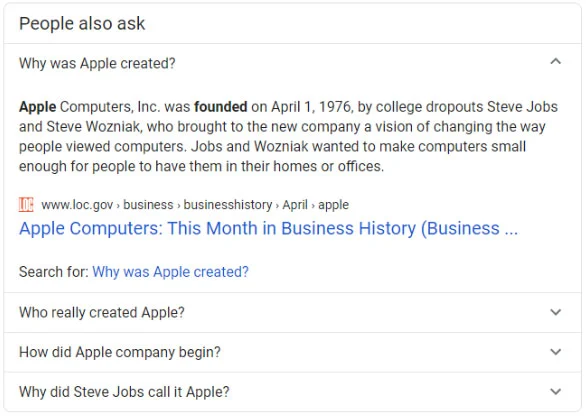
Right there, you've found three snippets to target: the main one plus those two related questions, which you can add to your content and answer in 40 to 60 words each.
The more you click those "People also ask" boxes, the more appear. You can build a lot of great content just from these questions. Use the search results page as much as you can to find new keywords, because Google knows better than we do what people are searching for and asking.
After reading this, you should have a solid understanding of how to win featured snippets, show up in AI Overviews, and improve your Google rankings.
Ready to start? Contact i7 today to talk about how we can help.


0 Comments